
[Topic of This Issue]
Three Synchronization Modes to Choose From
ERP-Led,WMS-Led or Bidirectional Synchronization?
Technical Lead for This Issue:Wu Simin
As a professional intelligent logistics system integrator,Shunli Intelligent is committed to delivering efficient and accurate warehousing and supply chain digital solutions for enterprises.In the construction of automated plant-wide logistics,data interconnection between underlying systems serves as the cornerstone to guarantee business continuity.
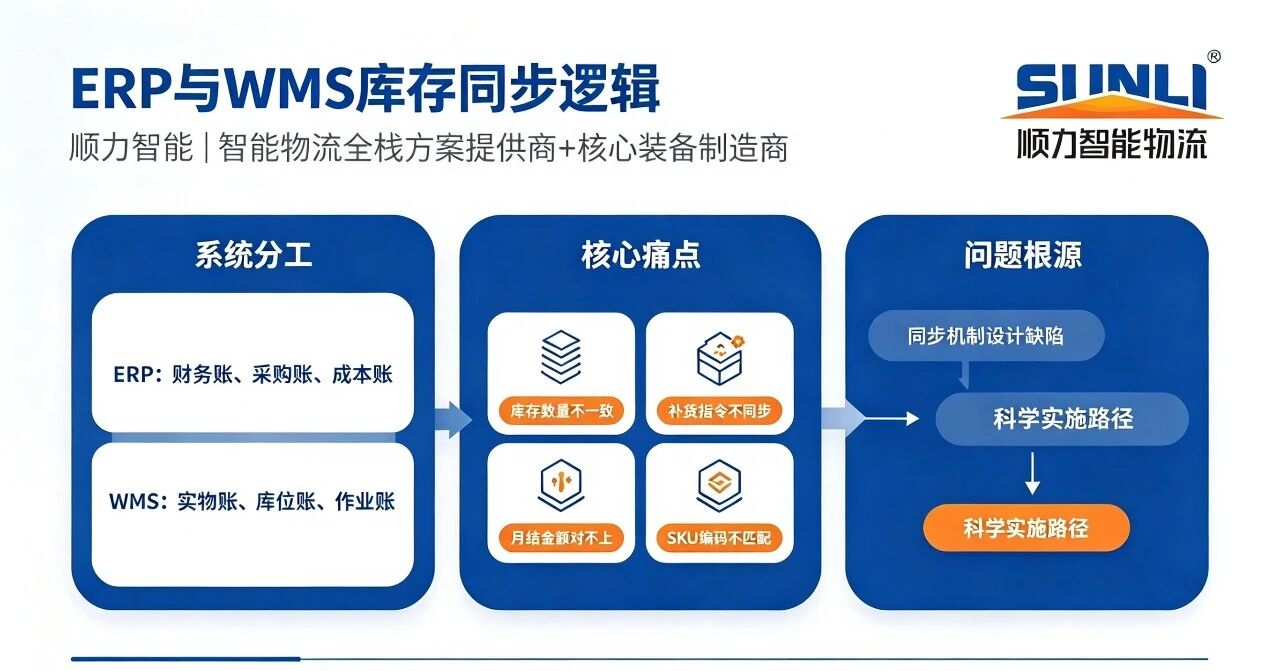
In an enterprise’s information architecture,ERP(Enterprise Resource Planning)and WMS(Warehouse Management System)usually run in parallel.ERP focuses on managing financial records,purchasing records and cost records,while WMS specializes in physical inventory records,location records and operation records.Although each system has its own responsibilities,inconsistency in inventory data remains a core pain point.If this issue is not properly addressed,warehouse managers often encounter the following dilemmas:
-ERP shows an inventory of 500 units for a certain SKU,while WMS only displays 320 units,making it difficult to determine which data to trust;
-ERP issues a replenishment instruction,but WMS indicates that the goods are still in the inspection area and have not been put away;
-At month-end closing,the inventory value in ERP fails to match the physical quantity in WMS,and troubleshooting is time-consuming with obscure root causes;
-The same SKU is coded as“A001”in ERP and“A-001”in WMS,leading to matching failures during interface data transmission.
The root cause of the above problems is not a single-system error,but flawed synchronization mechanism design between the two systems.This article provides an in-depth analysis of the sound implementation path for inventory synchronization between WMS and ERP.
PART 01
First Things First:
What Are the Differences in Inventory Perspectives Between ERP and WMS?
A prerequisite for understanding synchronization difficulties is clarifying how the two systems define“inventory”.
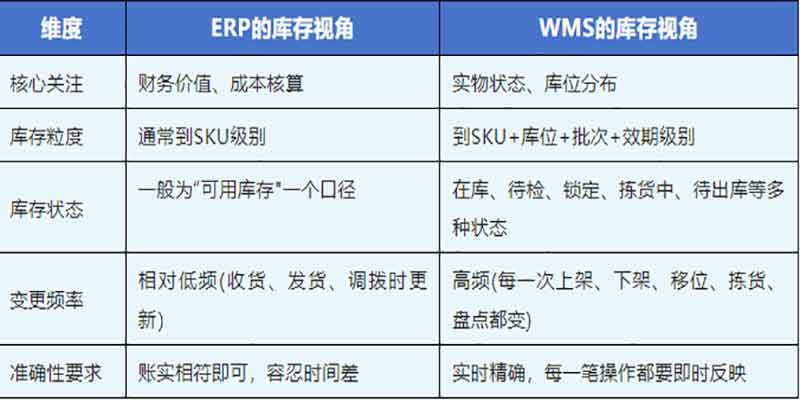
Take goods receipt as an example:when goods arrive at the warehouse,ERP increases inventory upon the“purchase receipt”step.In WMS,however,the goods may remain in“pending inspection”status and are not counted as available inventory.If the synchronization mechanism is poorly designed,conflicts arise where ERP shows stock availability while WMS marks the goods as unavailable.Therefore,the premise of building a synchronization mechanism is that both sides reach a clear agreement on what data to synchronize under which statuses.
PART 02
Three Synchronization Modes:
Who Triggers Actions and Who Holds the Final Say
Inventory synchronization between WMS and ERP essentially addresses the allocation of authority and responsibility for triggering,executing and confirming data updates.Three common synchronization modes are outlined below:
1.ERP-Led with WMS Execution:ERP acts as the decision hub,issuing instructions such as purchase receipt orders,sales delivery orders and transfer orders.WMS receives these instructions,carries out physical operations,and feeds execution results back to ERP for financial book updates.
2.WMS-Led with ERP Bookkeeping:WMS serves as the on-site execution hub to initiate and complete physical operations.ERP only receives results for accounting processing.For instance,operations including in-warehouse relocation,picking completion and stocktaking adjustments do not require initiation from ERP,yet their results must be synchronized to ERP.
3.Bidirectional Synchronization with Separate Management:ERP manages“financial inventory”and WMS manages“physical inventory”.The two systems reconcile data periodically via interfaces,with alerts and manual handling triggered when discrepancies occur.This mode seems flexible yet carries the highest risk.Without clear rules defining the authoritative data benchmark,discrepancies will accumulate and eventually result in messy accounts.
PART 03
Core Synchronization Design:
Four Critical Issues to Resolve
Regardless of the synchronization mode adopted,inventory synchronization between WMS and ERP must tackle four key challenges:
1.What to Synchronize?—Define synchronized fields and metrics:Not all inventory changes require synchronization.It is necessary to specify operation types that trigger synchronization(e.g.receipt,shipment,stock transfer,stocktaking adjustment,status change),synchronized fields(SKU code,quantity,batch,location,status,timestamp),and the type of synchronized data(real-time inventory or quantity variance).
2.When to Synchronize?—Real-time,scheduled or event-triggered:
-Real-time synchronization:Inventory changes are pushed instantly for optimal timeliness,yet it imposes high requirements on interface stability and system performance.
-Scheduled synchronization:Batch synchronization at fixed intervals(e.g.every 10 minutes or every hour).It is simple to implement but comes with time lag.
-Event-triggered synchronization:Synchronization activates upon specific business events(e.g.receipt completion,delivery confirmation),striking a balance between timeliness and controllability.
3.How to Handle Discrepancies?—Reconciliation framework and discrepancy workflow:Network outages,interface timeouts or abnormal data formats may cause synchronization failures.A robust fault tolerance framework must be established,including a reconciliation mechanism for regular data comparison,a classification mechanism to distinguish temporary deviations from substantive inconsistencies,and a standardized workflow clarifying verification responsibilities and adjustment basis.
4.How to Resolve Inconsistent Data Standards?—Code mapping and unit conversion:This is an easily overlooked step.A mapping table linking ERP material codes and WMS item codes needs to be built,supporting automatic conversion of measurement units(e.g.cartons vs pieces),alongside unified specifications for batch numbers and date formats.If these are not sorted out in the early project phase,interface errors and data inconsistency are highly likely after go-live.
PART 04
What Does a Typical Synchronization Workflow Look Like?
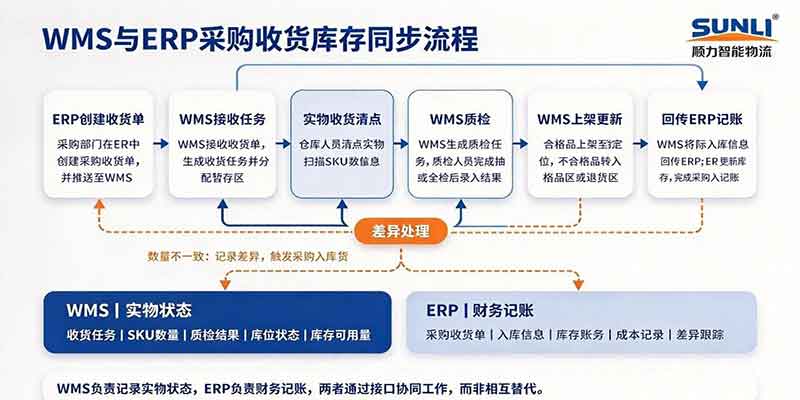
Take“purchase receipt”as an example to illustrate the practical business flow of inventory synchronization between WMS and ERP:
1.ERP Initiation:The purchasing team creates a purchase receipt order in ERP and pushes it to WMS.
2.WMS Reception:WMS receives the receipt order,generates the corresponding receiving task and assigns a staging area.
3.Physical Receipt:Warehouse staff count physical goods and register quantities by scanning SKUs.
4.WMS Quality Inspection:WMS generates QC tasks,and inspectors record results after sampling or full inspection.
5.WMS Putaway:After passing inspection,WMS schedules automated equipment to move qualified goods to designated locations based on allocation strategies and equipment capacity.Non-conforming goods are routed to the non-conforming area or return zone.
6.WMS Update:WMS confirms putaway,increases inventory,and updates the status to“available”or“non-conforming/pending disposal”according to inspection results.
7.Result Feedback:WMS sends the actual receipt information back to ERP.
8.ERP Bookkeeping:ERP updates inventory based on the feedback and completes the financial entry for purchase receipt.
9.Discrepancy Handling:If the actual received quantity differs from the quantity on the purchase order,WMS records the variance,which is synchronized to ERP to trigger subsequent replenishment or return processes.
In this workflow,WMS records the physical status while ERP handles financial bookkeeping.The two systems collaborate through interfaces rather than replacing one another.
PART 05
What Are the Costs of Poor Synchronization?
Many enterprises overemphasize WMS functions during supplier selection while underestimating the importance of synchronization mechanisms.The downsides of flawed synchronization design often emerge only after system launch:
-Unreliable inventory data:Conflicting data across the two systems leaves managers without a solid basis for decision-making;
-Reduced operational efficiency:Warehouse staff need to operate two systems simultaneously or manually check discrepancies,adding non-value-added workload;
-Financial risks:Mismatch between inventory value and physical stock undermines cost accounting and the accuracy of financial statements;
-Impaired customer experience:Sales teams promise stock availability that cannot be fulfilled,resulting in customer complaints and churn;
-Difficult project acceptance:Data inconsistencies delay acceptance and trigger disputes between clients and solution providers.
The aggregated losses far exceed the effort invested in defining synchronization rules at the early stage of a project.
Our team holds the view that inventory synchronization between WMS and ERP is ostensibly a technical integration task,yet essentially an alignment of business processes and data standards.For automated plant-wide logistics,it marks the“last mile”of the information chain.Only when procurement plans from upstream ERP and physical execution in downstream WMS maintain consistent data can decisions across the whole supply chain remain credible.

Scan to add WeChat